

Portfolio
Elementor Intro Videos
View the Elementor Intro video (found in the Schedule Week 1–all weekly videos can be found on the schedule page). You may also want to view the video from Week 2, as that will introduce you to the process we will use in class to buy hosting, and install WordPress (free) so we can work on our websites.
HTML Practice
W3Schools
- W3S Readings & Try it Yourself Webpage
- Quiz 1 (Review W3school readings first)
Codepen
- Set up an account in CodePen using @maine.edu account
- Create a new “Pen” by clicking on the Pen word/icon in upper left. This should open a new window like the one below.
- Follow the numbers to 1)name your file, 2)collapse the javascript window (we dont need it), 3) paste in the code below, 4) view the html output. Then compare the html code with what you see in the window. What can you deduce about HTML from looking at the code and the page?
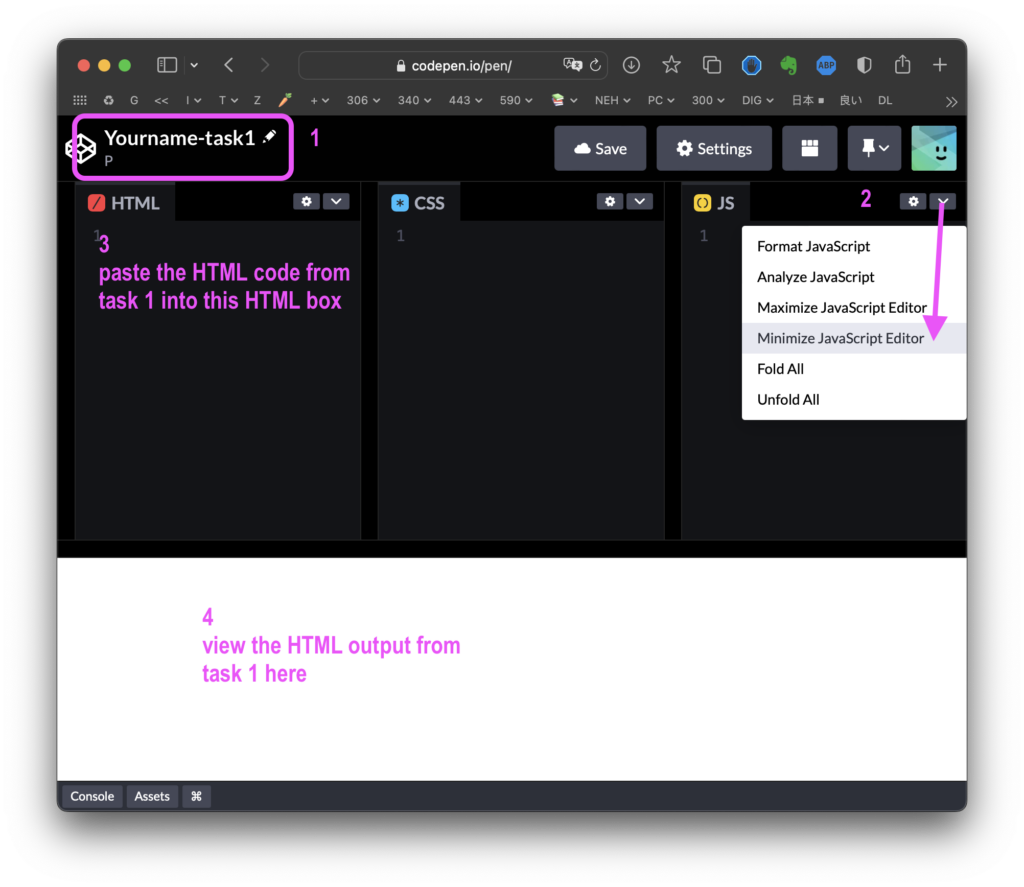
- Use the code below–select, then copy, then paste into your Codepen HTML window
- Change the country –Italy–to a country you have or would like to visit.
- Update the description to one that would fit with your own journey and country.
CODE:
<!-- 1. Add an <h1> with an id as title for the entire page. -->
<h1 id="introduction-heading">Spend a semester in Italy!</h1>
<!-- 2. Under each heading add a <div> with class "section" and an id. -->
<div class="section" id="introduction">
Embark on a journey to Italy, a land where ancient history and modern vibrancy blend seamlessly. Italy is not just a destination; it's an experience that stays with you, with its rich culture, tantalizing cuisine, and breathtaking landscapes. Perfect for young travelers, it promises an unforgettable adventure through some of Europe's most iconic cities.
</div>
WordPress Post on class website
- Login to class website and add new post
- Post Subject/Title: Task 1-yourname
- Category: Task 1
- Codepen: Your Codepen URL as a link that looks like this Joline’s Codepen 1
- Portfolio URL: If you have a portfolio from NMD 100 or NMD 200, or your own, add your WordPress.com URL like this Joline’s Portfolio
- Featured image: Find a thin horizontal image like in this post that you will use as your semester long “featured image”, and add it as your featured image. Keep it under 200 KB, a good size is 1280 by 400 pixels, or 1024 X 320.
- BRING A CREDIT CARD TO PAY FOR HOSTING ON MONDAY NEXT WEEK.